No sign-up
No account, no email, no password. Open the app and start adding coins.
You type in what you hold. Holdtotal prices it against the live market and shows the total in USD or BTC with the 24-hour change, and an Android widget keeps that number on your home screen. No account, no wallet connection, no API key.


Free, supported by ads. Available on Google Play and the App Store.
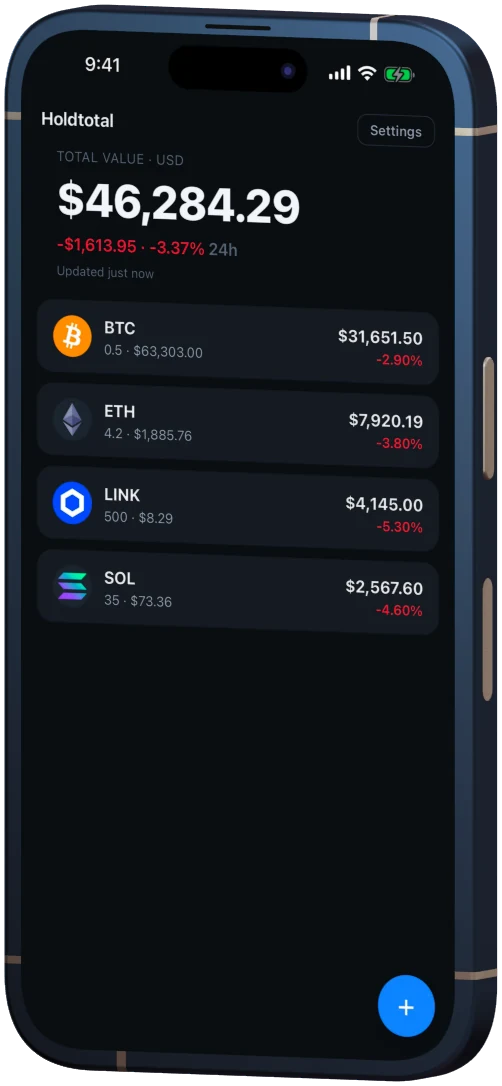
A manual crypto portfolio tracker is an app you type your balances into: it keeps the coin and the amount on the device, fetches a public market price and multiplies the two. It reads no wallet address and stores no exchange key, so the only holdings it knows about are the ones you entered.
Holdtotal is that and nothing more.
No account, no email, no password. Open the app and start adding coins.
Your entries are saved in the app's own storage, not on a Holdtotal server — there isn't one. Android backup may keep a copy in your Google Account.
Tap the total to switch between dollars and bitcoin. The app remembers your choice.
Pick a coin, type an amount, done. Change or delete a holding in two taps.
The top 250 by market cap, plus the Layer-2 and Bittensor subnet tokens CoinGecko lists in those categories.
The coin list ships inside the app, so search never calls an API and works offline.
Amounts are entered and shown to eight decimals, so a satoshi-sized position is not rounded away.
The Android build asks for internet access and nothing else.
Search the built-in coin list, type the amount you hold, and the total is on screen. Nothing has to be created or connected first, so the first number normally arrives within a minute of install.
Search by name or symbol across the 489 coins that ship with the app: the top 250 by market cap, plus the Layer-2 and Bittensor subnet tokens CoinGecko lists.
Type how much you hold, down to eight decimal places. Adding a coin you already hold opens it for editing instead of creating a duplicate.
Live prices with the 24-hour change, in dollars or bitcoin. Prices are held for 60 seconds before the app asks again; pull down to refresh sooner. The last ones fetched stay on the device, so the app still opens to a number offline.
On your phone, in the app's own storage. No Holdtotal server ever receives your coins and amounts, and there is no account for them to belong to. The one thing that can duplicate them is Android backup: with it switched on, Google may keep a copy of the app's data in your Google Account. Settings → Data → "Clear all data" wipes them after two confirmations, and deleting the app does the same.
Holdtotal is free and supported by ads. Google AdMob receives standard device and advertising information — your IP address, your advertising identifier, how you interact with ads — as our Privacy Policy sets out in full. What it never receives is your portfolio: your holdings are not used for ad targeting and are not passed to any advertiser.
Ad pacing is written into the app, not left to the ad network. One banner sits at the bottom of the portfolio screen and nowhere else; full-screen ads are capped at two per session and four per day, never less than three minutes apart, and never in the first minute after launch.
The app connects to exactly two places: CoinGecko, for public price data, and Google AdMob, for ads. It is an information tool — it reports what your own entries are worth at a public market price, it forecasts nothing, and it is not financial advice.
It does not buy, sell, swap or move anything, and it has no wallet or exchange connection it could do that through. There is no automatic import, no cost-basis or tax reporting, and no price alerts.
| What you want to do | Holdtotal |
|---|---|
| See what your holdings are worth now | Yes — in USD or BTC |
| Keep that number on the home screen | Yes — a resizable Android widget |
| Skip the account, the wallet connection, the API key | Yes — none of the three exists |
| Import trades from an exchange | No — every amount is typed in |
| Buy, sell or swap | No — it cannot move funds |
| Track cost basis, profit and loss, tax lots | No — present value, not history |
| Set a price alert | No — it never notifies you |
| Run it on iOS | Yes — it is on the App Store |
If you trade every day and need a ledger that fills itself in, a manual tracker is the wrong shape of tool. Holdtotal is for someone holding a handful of positions who wants one honest number.
Check what the app asks you to hand over, what its Google Play listing declares under Data safety, and whether anything it requests could move your money. No tracker needs a recovery phrase, a private key or a withdrawal-enabled API key, so a request for one of them ends the evaluation.
The three ways a tracker can learn what you hold — a public address, an exchange key, or your own typing — and what each costs you.
Read the article
What "no sign-up" rules out, what it does not, and three checks on the Play listing that take about two minutes.
Read the article
Why no tracker can ever need your recovery words, how the request is disguised, and what to do if you already typed them.
Read the article
Free, no account, no wallet connection, no in-app purchase. On Google Play and the App Store.
Yes. Holdtotal is free to download and free to use, with no subscription and no in-app purchase. Ads keep it that way.
No. There is no sign-up, no email address and no password, because there is no Holdtotal account to create.
No. Holdtotal has no wallet connection and no exchange integration: you enter your amounts by hand. It never touches your keys and it cannot move your funds.
On your phone, in the app's own storage. Settings → Data → "Clear all data" wipes your holdings after two confirmations, and so does deleting the app — unless Android backup is switched on, in which case Google may keep a copy in your Google Account.
No. Your holdings are never shared with an advertiser or used to target ads. Google AdMob does receive standard device and ad information — the Privacy Policy sets out exactly what.
You can hold as many of the 489 bundled coins as you like. Prices come from CoinGecko, a third-party market data provider, and may be delayed or inaccurate.